Budget Tracker (Demo)
An interactive demo web app for manually tracking income and expenses, highlighting clean design, usability, and clear financial insights.
Overview & Purpose
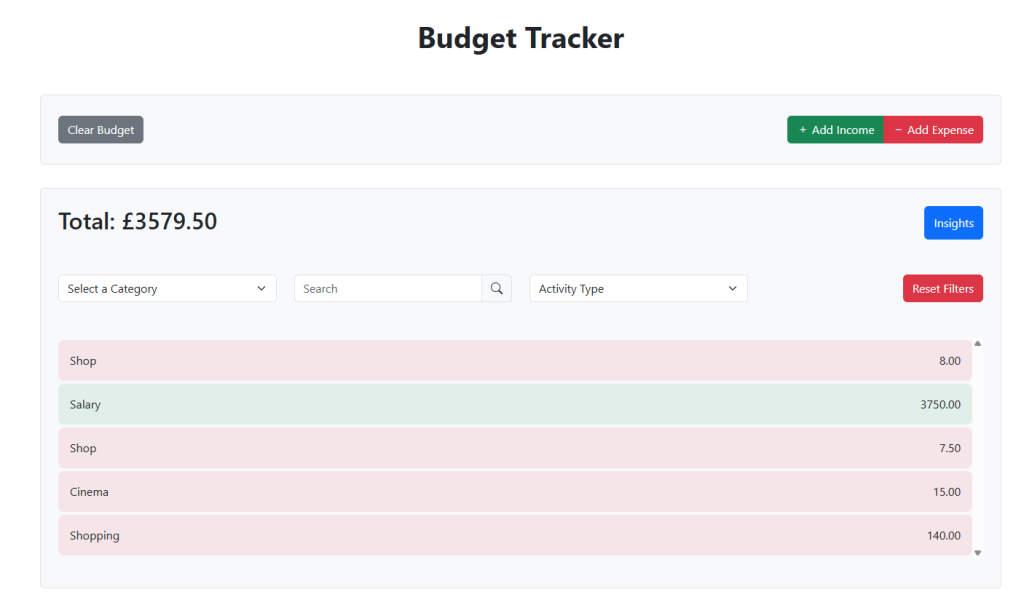
This demo web app allows users to manually add and categorize income and expenses, view totals, and see spending trends. Users can filter their activity and access insights at a glance. Unlike commercial budgeting apps, it does not connect to banking APIs, and all data is session-based, clearing when the browser is closed.
The goal of this project was to showcase UI and UX design principles alongside front-end development skills in an interactive, user-friendly tool.
Approach
Because the app is highly interactive, I built it using Vue.js, leveraging its reactive data-binding and component-based architecture to provide a smooth and responsive experience. Each interface element—activity list, sidebar form, and filters—was developed as a modular component, making the app maintainable and easy to extend.
A key consideration was financial security and user privacy. To avoid handling real banking data, I implemented a manual entry system with session-based storage. This allowed users to interact fully with the app without any risk to sensitive information while still enabling real-time updates to totals and filtered views. The reactive nature of Vue ensured all components stayed synchronized as users added, edited, or removed activity.
Interactive feedback was another focus. Totals and activity are consistently color-coded, using green for income and red for expenses, allowing users to quickly understand their financial trends.
Design
The design emphasizes clarity and usability. To avoid cluttering the main interface, I implemented a toggleable sidebar for adding income or expenses, including details and reference information. Totals and filters are displayed prominently on the main interface, giving users immediate insight into their spending patterns. Consistent color-coding and clean layouts ensure information is conveyed efficiently without overwhelming the user.
Challenges & Learnings
One challenge was maintaining consistent, real-time updates across totals and filters, particularly given the manual, session-based nature of the data. Careful state management and Vue’s reactivity were essential to solving this.
Balancing simplicity and functionality in the interface was another challenge. The toggleable sidebar helped provide all necessary functionality without cluttering the main view.
A key learning was the importance of designing with security and privacy in mind, even for demo projects. Avoiding real financial data led to design decisions that maintained usability while protecting users. The project reinforced skills in component-based development, interactive UX design, and responsible decision-making in application design.
Conclusion
Through this project, I was able to:
- Demonstrate UI and UX design principles while maintaining full functionality
- Build a fully interactive, component-based front-end application using Vue.js
- Showcase the ability to combine design, development, and thoughtful decision-making into a cohesive, user-friendly tool